 Decktly
PowerPoint for HTML
Auf Deutsch lesenPowerPoint for HTML: edit HTML slides visually
By Hannes Krieg · Updated 27 September 2026
Edit HTML like you edit a slide. Open a presentation from Claude, ChatGPT, or another tool and change the text and layout yourself. Add charts, tables, and slide masters, leave comments, present, and save HTML. The desktop app can also export PDF or PowerPoint.
Free account to save · Visual editing for HTML presentations
The workflow
The familiar part comes first.
Open your presentation
Open the .html file in Decktly and switch to Edit mode. Work on the presentation itself, rather than copying its content into another format.
Click, type, and format
Rewrite a heading, update a number, or move an object. Use the formatting toolbar for emphasis, then add a chart or table when the slide needs one. Save a copy before extensive changes.
Leave feedback where it belongs
Add a comment beside a claim or chart. Replies and @-mentions stay inside the HTML file, next to the material they concern.
Present, save, or export
Switch to Present mode for a full-screen view, and save the deck as HTML. If you need a PowerPoint or PDF file, export it from the desktop app.
PowerPoint features, and what Decktly does
| In PowerPoint | In Decktly |
|---|---|
| Slide master | Reusable layouts with theme colours and fonts. Start a new deck from a master, or apply one to a Decktly slide deck. |
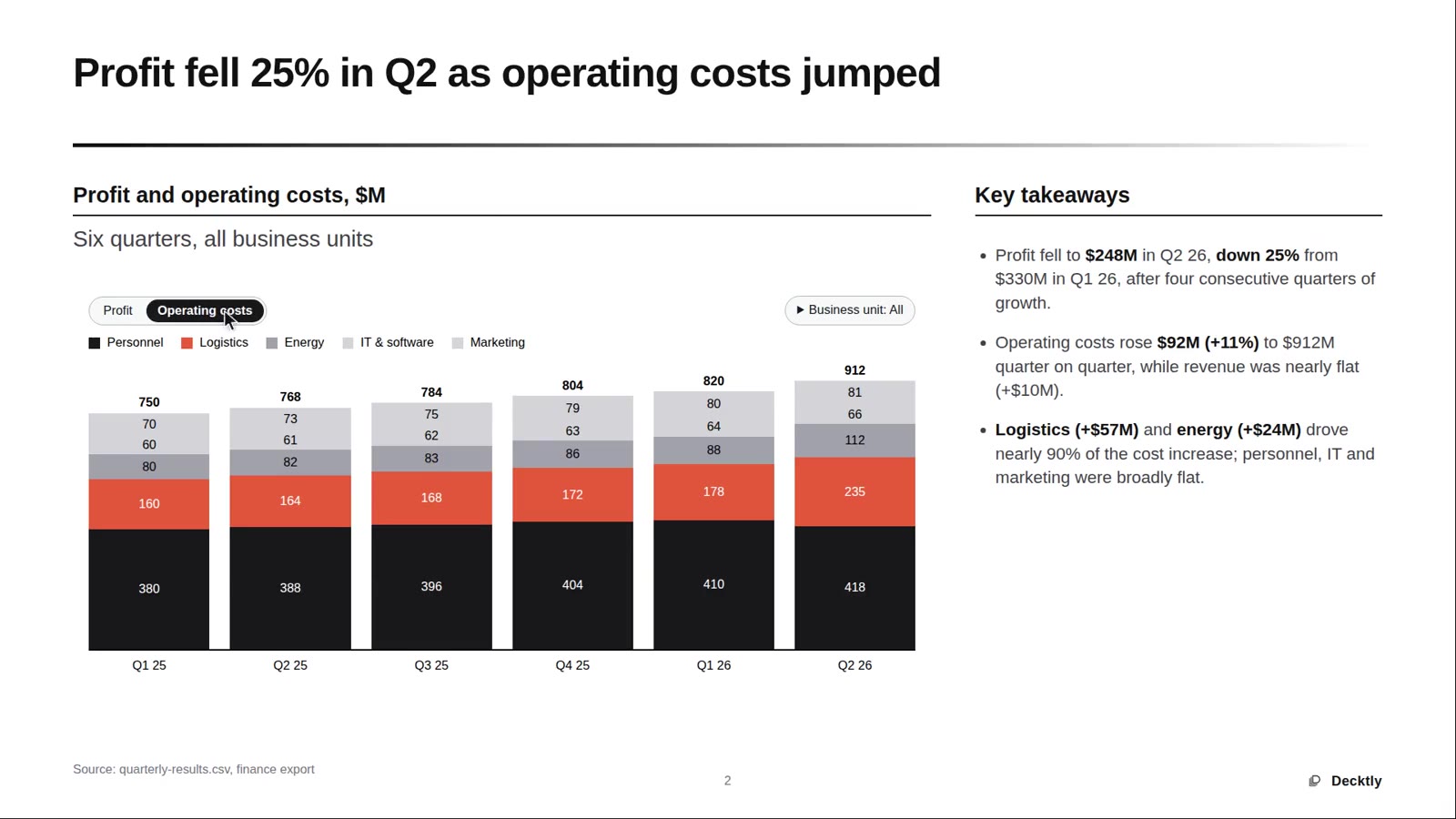
| Charts | 13 chart types, with a data grid and a format dialog. Toggles and filters stay interactive while you present. Charts brought in from another tool are not always editable. |
| Tables | Select cells, merge and split them, and add a heatmap. |
| Shapes and media | Shapes, connectors, pictures, icons, and links. |
| Slide panel | Hidden slides, sections, and drag to reorder. |
| Comments | Comments, replies, and @-mentions, stored in the HTML file. |
| Find and replace | Search the deck and replace text. |
| Present | Full-screen presentation of the same HTML file. |
| Export | Desktop app only: PDF, and PowerPoint (.pptx). Decktly slide decks export as pictures with editable text boxes; other HTML decks export as pictures only. There is no PPTX import. |
HTML to PowerPoint? Keep it HTML (or export)
A search for PowerPoint for HTML often means someone wants a converter. Decktly starts from the other direction. You edit the HTML deck and save HTML, so interactive charts and filters can stay live.
When a PowerPoint file is what you need, the desktop app can export one. On a Decktly slide deck each slide becomes a picture with editable text boxes on top; other HTML decks export as one picture per slide. The same app exports PDF. Decktly does not import .pptx files, so this is not a round trip back into PowerPoint.
What “like PowerPoint” means.
The phrase describes familiar editing steps, not every PowerPoint feature. Complex CSS, canvas drawings, and some embedded frames still need code. Frames embedded as srcdoc can be edited; data: URLs and separate files are view-only. Comments stay in the file even when a browser does not show them, so review them before you share the deck.
A few useful answers
Is there a PowerPoint equivalent for HTML files?
Decktly is a visual editor for HTML presentations: text and layout, charts, tables, slide masters, comments, and presenting. The desktop app also exports PDF and PowerPoint. It does not include every PowerPoint feature, and it does not import .pptx files.
Can I freely rearrange every HTML element?
Not every HTML element behaves like a PowerPoint shape. Editing and layout controls depend on the element, the HTML structure, and your Decktly version. Complex CSS layouts and scripted elements can require code changes.
Does this convert my HTML presentation into PowerPoint?
Decktly edits and saves HTML, so your deck stays interactive. If you need a PowerPoint file, the desktop app can export to .pptx: on a Decktly slide deck each slide becomes a picture with editable text boxes on top, and other HTML decks export as pictures only. It can also export to PDF. Importing .pptx files is not supported.
Can I keep interactive tabs and calculators?
The file remains HTML, so it can retain its existing interactive content. Test the saved presentation: external dependencies and custom scripts can affect how it works.